Product docs
Everything nTilia can do.
Offline Markdown editor with write mode, field Missions, on-device vault, local Whisper (audio never leaves the phone), re-importable Mission ZIP, AI you review word by word, bilingual FR/EN journal, research notebook with Zenodo DOI. A catalog to decide — then write.
Editor
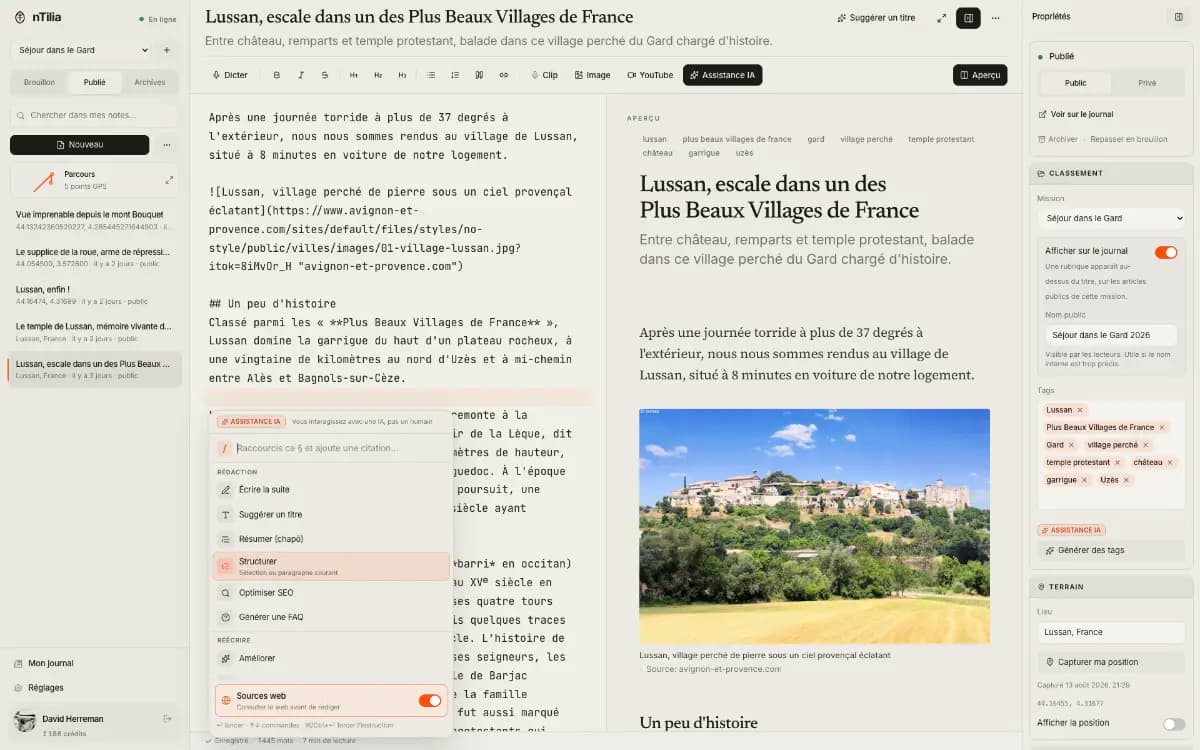
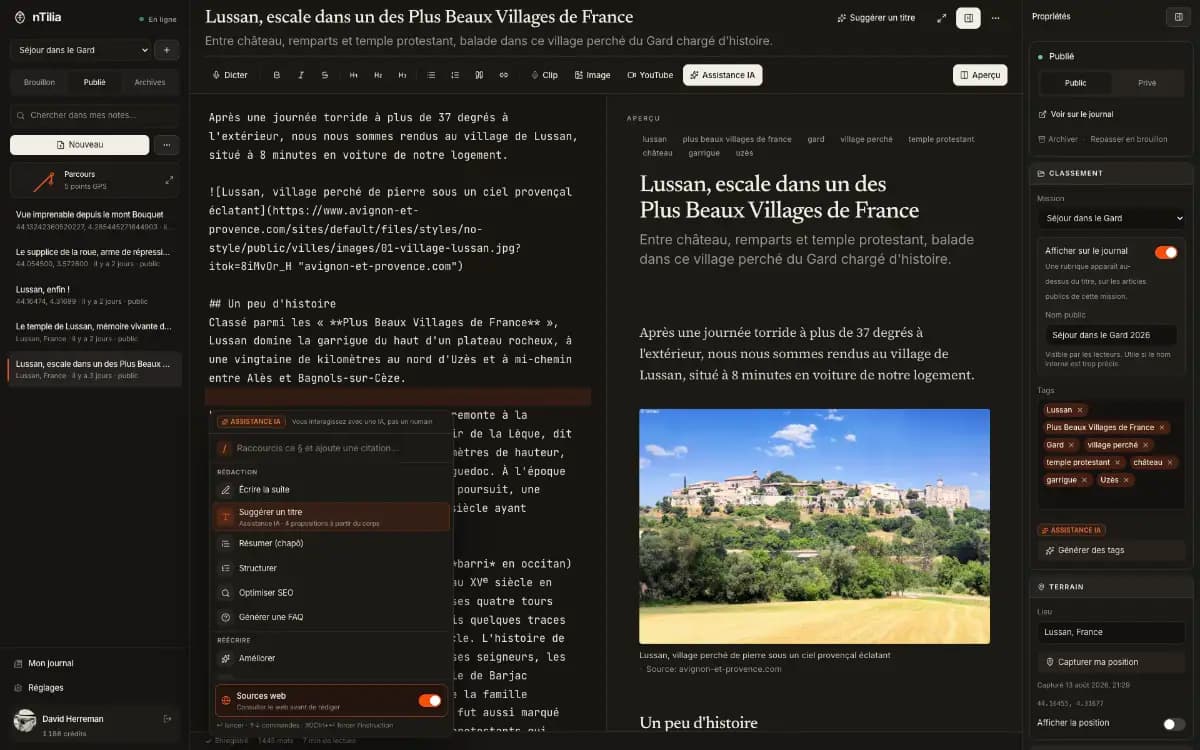
Markdown first. The UI steps aside.
A calm editor to write, link Mission notes, cite live, and export for the newsroom — without stacking menus.
Markdown editor (CodeMirror)
Fluid writing, familiar shortcuts, preview within reach.
All plansThemes & appearance
Canvas, Nuit, or system — comfortable reading in the field or at a desk.
All plansImport .md
Bring existing notes without changing format.
All plans/ block menu
Type / at the start of a line: headings, lists, tasks, quote, code, table, image, YouTube, note link, footnote, formula — filtered as you type. AI stays the first entry.
All plansWrite mode
Ctrl/⌘⇧E folds the rail, inspector, and preview: only the current paragraph stays sharp, the cursor stays mid-screen, and the toolbar fades while you type.
All plansSelection toolbar & Publish button
Bold, italic, link, quote, or AI on selected text. One Publish button whose label follows the state: Publish, Scheduled, Update, Published.
All plansOutline & Whisper timestamps
Outline tab in the inspector: jump to H1–H3 headings and Whisper [mm:ss] cues — one click puts the caret back in the note.
All plans[[Note]] links inside a Mission
Connect investigation threads: [[Title]] autocomplete covers notes in the active Mission, drafts included — not a global PKM graph.
All plansZotero / BibTeX citekeys while writing
Pick a local Better CSL JSON or BibTeX file; type [@citekey] to insert. Private by default — nothing is sent to the cloud. APA/RIS/JATS Cite stays at publish time.
All plansImport sources from the text
“Sources” headings, lists, DOIs, URLs, ISBNs, and APA references in the note body become a checklist — without overwriting or duplicating. A bare year stays a year.
All plansTable of contents [TOC]
From the / menu: an outline of the first two heading levels. In the Research profile it’s automatic on long articles; [NOTOC] removes it. Preview, journal, print, and PDF.
All plansNote skeletons
At creation: blank, 5W, interview, or lab method — date, place and GPS prefilled when known.
All plansMission submission export (.docx)
From a Mission: journalism or science profiles that aggregate notes into a .docx for the newsroom or journal — the web journal stays the origin.
All plansPersonal glossary
NGO acronyms, place names… define once, suggested as you type even offline, and explained to readers on hover on your public journal.
All plansVersion history
Automatic and manual milestones, word-level visual diff, restore an earlier state. Private — never shown on the journal. Works offline, encrypted with the vault.
All plansAll notes view
A flat list across Missions and folders, newest first, with search and Mission / status filters. The vault stays on the device.
All plans
Field
Capture where the network ends.
Dictate, photo, audio — grouped in a Mission. Offline first. Sync runs when nTilia is open, the vault unlocked, and you have a network — not from a locked pocket. With the vault on, takes, notes and missions are encrypted on the device.
Missions
One folder per trip. Notes attach to it; the ZIP export takes that Mission only, on this device. Everything else stays in Unassigned.
All plansPhoto and audio takes
Capture from the home screen without creating a note. When signed in, they sync (private) once nTilia is open, the vault unlocked, and you have a network — not from a locked pocket. The mission ZIP is your copy on this device.
All plansExtract text from a photo
On a photo take: Tesseract on the device, offline (English, French, Dutch), a Photo | Text review, then a linked block in the note. From Pro: Extract with AI reads handwriting or captions a scene — after you confirm the upload.
All plansVault and device notes
AES-256-GCM, key derived with PBKDF2. With the vault on, all of IndexedDB is encrypted at rest. Device-only notes never sync; the rest, once synced, is readable by nTilia.
All plansRoute map
In an open Mission, notes with GPS land on a private map. The public journal does not show it.
All plansBrowser dictation
Raw speech into Markdown, usable offline depending on the browser.
All plansField photo + caption
Anchor an image to the note; cloud upload needs the network.
All plansPlace, GPS, timestamp
Optional context to situate the note in space and time.
All plansPWA & offline mode
Install the app and allow persistent storage — otherwise the browser can wipe everything. Keep writing without forcing the cloud.
All plansDeferred sync
Signed in, a counter for pending notes and takes; they leave when the network returns, if nTilia is open and the vault unlocked. Without an account, the rail offers to turn on free sync.
All plansExport this mission (ZIP)
Notes .md, images, audio, takes, and manifest of the open Mission — a pack you can re-import into another Mission or on another device. Prepare departure runs sync + ZIP and flags an outdated pack. Photos are included in DOCX, PDF, and EPUB exports.
All plansSafe recipient
Another account (newsroom, desk) gets an end-to-end encrypted snapshot whenever the notebook changes — one copy per state, at most every 10 min, the last 3 kept. The newsroom opens it with their vault (opened at least once before the copy is sent); you, with the file + your phrase. Burn empties your cloud; this off-body copy stays.
Pro & upTravel Mode
The device no longer carries sensitive notes. Travel-safe missions (logistics) stay; the rest is removed, not hidden. Requires the vault. The public journal can be hidden during the trip. Turning it off takes 24 hours, unless the safe recipient approves: the notebook cannot be reopened under duress. The already-public journal is unchanged.
Pro & upEmpty / Burn
Empty: nTilia leaves this device, the cloud stays (restorable after 24 hours or the recipient’s approval). Burn: the private cloud is destroyed too; the recipient drop is not touched. Both can also be triggered remotely, by you or your recipient, for a seized phone. Last resort if A/B never left the phone. Destroying your data is never paywalled.
All plansReimport .ntilia
After a burn or an evacuation: open with your vault (copies addressed to you) or with the author’s phrase, same UUIDs in IndexedDB, then push to an empty cloud. Getting your notes back does not depend on the plan.
All plansBackground dossier
On demand, a sourced working brief: geography, hazards, history, society, economy and politics of the place. For you — nothing is added to your notes. A credit-free Data tab: Wikidata, World Bank, HDX, and WHO alerts, each figure with its source.
Pro+
AI
Refine online — nothing without your OK.
AI helps correct, structure, and source. Each action spends credits and waits for your approval.
Spelling, tone, ready to publish — reviewed word by word
Every proposal opens in three views: Changes (word-level diff), Side by side, and Result, which you can retouch before accepting.
All plansTranslation into 10 languages
French, English, Spanish, Portuguese, German, Italian, Dutch, Arabic, Swahili, Ukrainian — without leaving the editor.
All plansPersonal voice & professional tones
Match your voice or a work context.
All plansTitles, subtitles, tags, continue, ghost text
Title only, subtitle only, or more suggestions; tags offered as chips you tick, never added automatically. Always optional.
All plans“Do no harm”
Flags identifiable people, minors, precise locations, and consent: high risks are rewritten, the rest is flagged. Run it before you publish.
All plansInterview quotes
Pulls quotes from a transcript with speaker and timecode, ready to insert.
All plansFAQ block for readers and AI agents
Generates Q&A from the article, with FAQPage markup for search engines and bots.
Pro & upOn-device Whisper transcription
The model stays on the device. Audio is not uploaded. Once downloaded, it works offline.
Pro & upAI review of the transcript
After Whisper, AI proofreads the text (glossary and Mission names) — the audio stays on the device. You accept in the transcript review.
Pro & upAsk my Mission notes
Ask one question across a Mission’s notes: the answer cites them as [[links]]. Vault notes are never sent.
Pro & upSourced web research
Sources, images, and passages to insert and back a story.
Pro+Fact-check
Claims in the article are extracted, searched on the web, and returned with sourced verdicts — the background dossier included.
Pro+Background dossier
A sourced brief of the place: geography, hazards, history, society. To review and pick from — not an article ready to publish.
Pro+Premium model (heavy actions)
More power on complex tasks, with higher monthly credits.
Pro+
Journal
Write. Then be read — and cited.
A quiet public journal — bilingual FR ↔ EN — built as a source of truth: citable, correctable without erasing, syndicable to WordPress or Ghost. Search-engine indexing is a Pro feature. How-to guide
Public, private, or unlisted journal
Publish when ready. Private stays off the journal; Unlisted is direct-link only — kept out of Google, RSS and the index.
All plans/u/username profile
A readable URL for your feed and posts.
All plansRSS & JSON Feed
Every public journal has /u/username/feed.xml and feed.json — follow in a reader, no account and no likes.
All plansCite (APA, Chicago, BibTeX, RIS, JATS)
A Cite block on every article: one format at a time, one-click copy, RIS / JATS export for Zotero and journals. The DOI, when there is one, replaces the URL.
All plansCorrection note
When you update a live piece, an “Updated” dateline and optional note under the byline — traceable, no alarmist banner.
All plansPublished versions
Each “Update” archives the snapshot that was live. Readers browse the chain, compare the texts, and you can republish an earlier version.
All plansSources (opt-in)
Who, quote, URL, date — private by default. Tick “visible on the journal” to show them under the article and include them in RIS / JATS.
All plansLicence (Creative Commons…)
Set CC BY, BY-SA, BY-NC, all rights reserved, or free text — shown under Cite for reuse.
All plansCode blocks
Markdown fences become editorial figures: detected language, line numbers, a Copy button, in the journal’s palette.
All plansSensitive field
For journalists and missions: location hidden by default, no GPS in C2PA manifests, donation or support link.
All plansNews SEO: NewsArticle, IndexNow, news sitemap
NewsArticle JSON-LD, IndexNow ping on publish, Google News sitemap (48 h) and indexing — so you can be found and cited. From Pro.
Pro & upllms.txt per journal
Each journal publishes its own llms.txt (also on a custom domain) with a consistent JSON-LD graph — to be read and cited by AI assistants.
Pro & upBilingual journal FR ↔ EN
AI proposes the translation; you review. A language switch for readers, with hreflang.
Pro & upWordPress, Ghost & webhook syndication
nTilia stays the origin: each public update can push to WP/Ghost or an HMAC webhook. Not a second CMS to maintain.
Pro & upFediverse & webmentions
ActivityPub: follow your journal from Mastodon. Outbound and inbound webmentions to link replies.
Pro & upSite & donation links
Connect your journal to your site or a support page.
Pro & upHide sponsored link
Remove the AWAKEN DESTINY link from your public journal.
Pro & upCustom domain
Serve the public journal on a subdomain you control (CNAME). The ntilia.com/u/username URL stays valid.
Pro+Publishable Mission context
Publish the reviewed sections of a background dossier, with its data and a licence, as a numbered, citable version attached to a series and its articles. Zenodo DOI available.
Pro+
Research
The field notebook that becomes citable.
For field researchers: offline readings, a declared abstract and co-authors, live Zotero citekeys while writing, one-click Zenodo DOI. nTilia replaces neither the journal nor the institutional repository — it makes the notebook citable. Read the Research story
Research writing profile
In Settings → Journal: missions become projects, the Academic style is suggested, the AI notice shows whenever a passage was generated, the sponsored link is hidden.
All plansAbstract, co-authors & ORCID
A declared abstract and co-authors (name, ORCID, affiliation, role) in the frontmatter: multi-name byline, JATS contributors and abstract, multiple authors in RIS and BibTeX, Zenodo creators.
All plansFootnotes & formulas
GFM footnotes [^1] and KaTeX math ($…$, $$…$$) rendered server-side: article, preview, RSS, PDF. No CDN.
All plansAcademic journal style
Reading serif, boxed abstract up top, figures and tables numbered by CSS counters, margin notes on wide screens, preprint PDF with authors, ORCID, affiliations, licence and dates.
All plansTyped data & code
Each source can be a reference, a dataset or code: shown grouped under the article, included in RIS and JATS.
All plansLive Zotero, Google Scholar, ScholarlyArticle
While writing: local bibliography (Better CSL JSON / BibTeX) and [@citekey] autocomplete. At publish: one-click RIS and JATS export, Highwire tags (citation_author, citation_doi…), ScholarlyArticle JSON-LD with authors, abstract, licence and DOI.
All plansZenodo DOI
One-click Zenodo deposit (PDF + Markdown source, CC licence): the DOI shows under Cite and flows into APA, BibTeX, RIS, JATS and JSON-LD. The DOI is frozen with each archived public version.
Pro & up
Platform
On the web, on the phone.
FR/EN i18n, AI credits, an installable PWA — no store apps for now.
French & English
UI and marketing in both languages.
All plansAI credits (weekly / monthly)
Free: weekly refill. Pro & Pro+: monthly. Credit packs available on every plan.
All plansStripe: subscription & packs
Upgrade to Pro, manage the customer portal, buy credits.
Pro & upInstallable PWA
Install from the browser, on phone and desktop. Allow persistent storage — otherwise the browser can wipe the local vault. No store apps for now.
All plansThird-party tokens encrypted at rest
Zenodo token, WordPress / Ghost passwords, webhook secrets and ActivityPub keys are verified, then sealed with AES-256-GCM server-side in a table the browser cannot read. They are never sent back to the UI; the key rotates without downtime.
All plansTwo-factor authentication (TOTP)
Turn it on in your account: QR code and one-time recovery codes. The code is asked only at login, never at sign-up.
All plans
Plans
What changes by plan.
Free is enough to write, capture, encrypt, and publish a citable journal. Pro unlocks news indexing, CMS syndication and volume. Pro+ adds a custom domain, the background dossier, sourced web research and more credits. Teams go through the Newsroom plan, on quote.
| Feature | Free | Pro | Pro+ |
|---|---|---|---|
| Markdown editor + preview | Included | Included | Included |
| Personal glossary (acronyms, places) + offline autocomplete | Included | Included | Included |
| Full version history + visual diff (offline) | Included | Included | Included |
| Offline / PWA / deferred sync | Included | Included | Included |
| Missions + re-importable ZIP export | Included | Included | Included |
| Dictation, photo, place (in a note) | Included | Included | Included |
| Photo and audio takes (outside notes) | Included | Included | Included |
| AES-256-GCM vault (IndexedDB at rest) | Included | Included | Included |
| Two-factor authentication (TOTP) | Included | Included | Included |
| Safe recipient (encrypted off-body copy) | Not included | Included | Included |
| Travel Mode (empty device at a checkpoint) | Not included | Included | Included |
| Public journal (shareable link) | Included | Included | Included |
| Cite (APA, Chicago, BibTeX, RIS, JATS) | Included | Included | Included |
| Co-authors & ORCID, abstract, footnotes & formulas | Included | Included | Included |
| Unlisted + correction note | Included | Included | Included |
| Published versions (chain + compare) | Included | Included | Included |
| Sources (private by default, journal opt-in) | Included | Included | Included |
| Creative Commons licence (or other) | Included | Included | Included |
| Indexed journal (NewsArticle, IndexNow, news sitemap) | Not included | Included | Included |
| WordPress / Ghost / webhook syndication | Not included | Included | Included |
| Zenodo DOI (PDF + Markdown), ActivityPub, webmentions | Not included | Included | Included |
| Custom domain (CNAME) | Not included | Not included | Included |
| Cloud articles / month | 25 | Unlimited | Unlimited |
| Public posts / month | 8 | Unlimited | Unlimited |
| AI credits | 40 / week | 600 / month | 1,200 / month |
| Buyable credit packs | Included | Included | Included |
| AI editing (proofread, structure, “Do no harm”, quotes) | Included | Included | Included |
| Generative writing (continue, SEO, article translation) | Not included | Included | Included |
| Whisper transcription (on-device) | Not included | Included | Included |
| Ask my Mission notes | Not included | Included | Included |
| Site & donate links / hide sponsor | Not included | Included | Included |
| Sourced web research | Not included | Not included | Included |
| Sourced fact-check | Not included | Not included | Included |
| Background dossier (place context) | Not included | Not included | Included |
| Premium model | Not included | Not included | Included |
Ready to try it?
Free, no card. Offline from the first note. Move to Pro when volume asks for it.